On/off switch symbols are small, but they carry important meaning. You may see them on computers, lamps, power strips, kitchen appliances, audio equipment, tools, routers, printers, and many other devices.
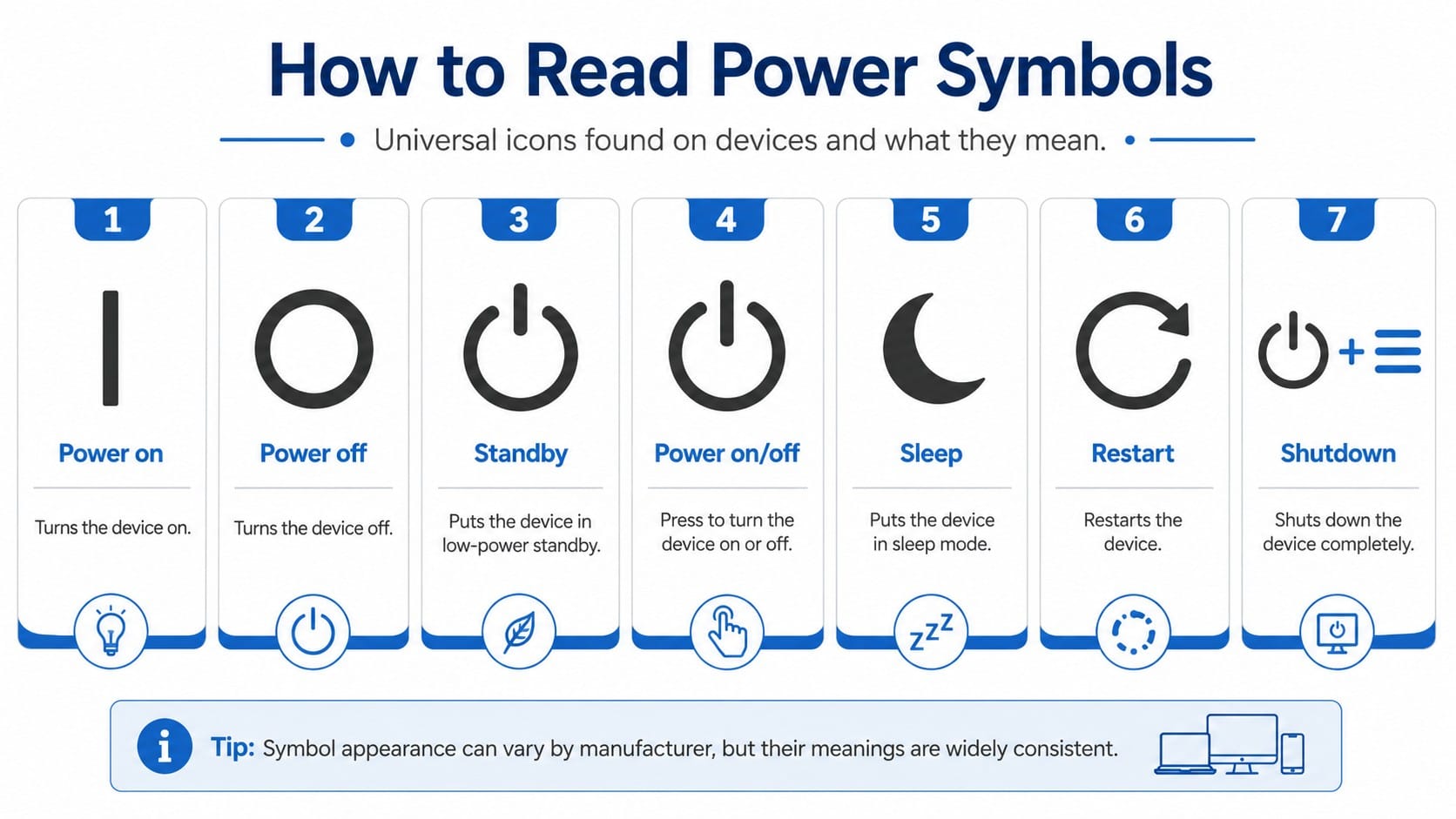
The most common symbols are simple:
- I means on.
- O means off.
- A line inside a broken circle usually means standby.
- A line inside a full circle often means a power button that toggles between on and off.
These symbols help people understand equipment controls without relying on one language. However, they can also cause confusion. Many people assume that “off” always means completely safe to touch, or that standby means the same thing as off. That is not always true.
This guide explains the meaning of common on/off switch symbols, how they differ, where you may see them, and what safety rules to follow before touching, cleaning, replacing, or repairing any electrical device.
Quick Answer: What Do On/Off Switch Symbols Mean?
| Symbol | Common Name | Basic Meaning | Practical Note |
|---|---|---|---|
| I | Power on | The device or circuit position is on | Power is supplied to the controlled function |
| O | Power off | The device or switch position is off | It may not mean every internal part is safe to touch |
| Broken circle with vertical line | Standby | Low-power or standby condition | The device may still draw power |
| Full circle with vertical line | Power on/off | One button toggles power state | Common on computers, TVs, monitors, and electronics |
| Crescent moon | Sleep | Low-power sleep mode | Common on computers and keyboards |
| Circular arrow | Restart | Turns off and starts again | Common in software menus |
| Power icon plus menu | Shutdown | Closes system and powers down | Common in computers and operating systems |
Why Power Symbols Exist
Power symbols exist because electrical and electronic devices are used across many countries and languages. A simple symbol can communicate a function faster than a word.
For example, a person may not understand the word “off” in another language, but they can still recognize a circle symbol on a switch. This is useful for appliances, industrial equipment, consumer electronics, medical devices, computers, and public-use equipment.
Standard symbols also reduce confusion. When the same symbols appear across different devices, users learn what to expect.
The Meaning of “I” on a Switch
The symbol I means on.
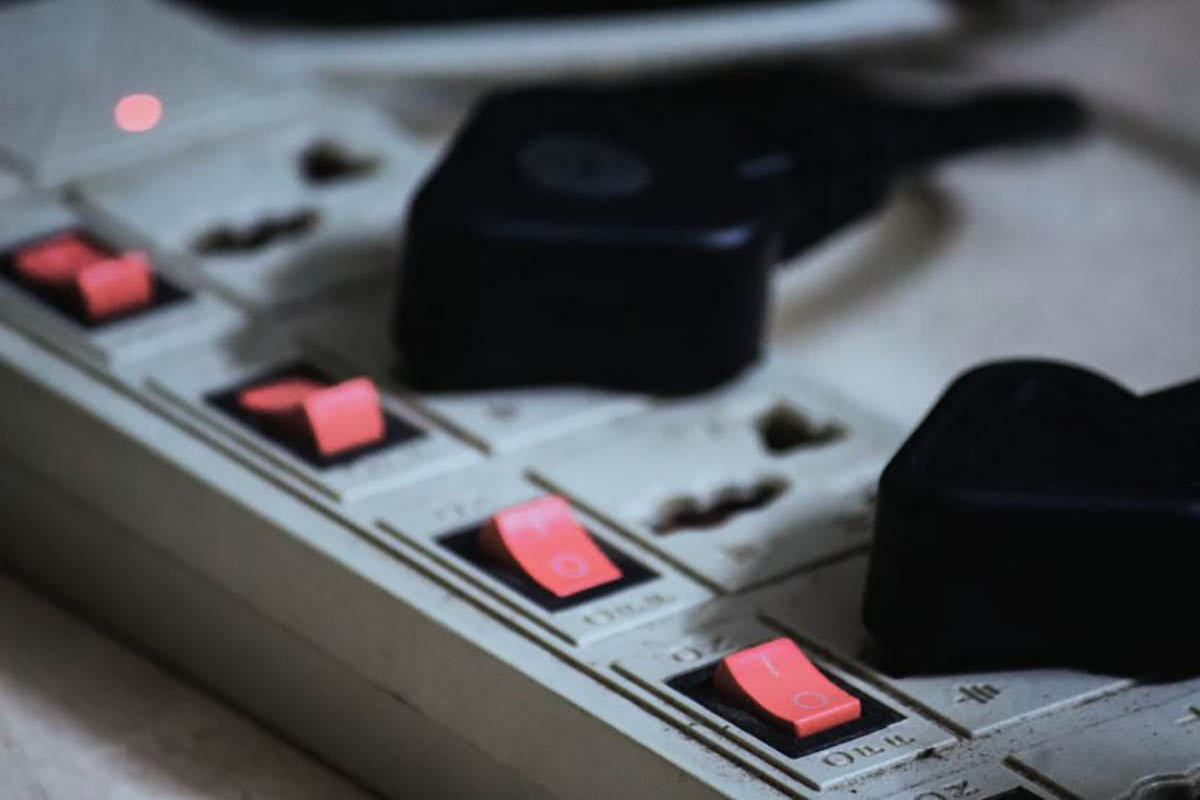
It is commonly used on toggle switches, rocker switches, power strips, appliances, and equipment panels. When the switch is moved toward the “I” side, the controlled function is intended to receive power.
You may see “I” on:
- Power strips
- Lamps
- Fans
- Extension switches
- Kitchen appliances
- Audio equipment
- Machine panels
- Laboratory equipment
- Industrial controls
In simple terms, I means the switch is in the on position.
The Meaning of “O” on a Switch
The symbol O means off.
When the switch is moved toward the “O” side, the controlled function is intended to be off. This symbol is common on rocker switches, toggle switches, and power controls.
However, “off” should not be treated as a guarantee that every internal part of a device is safe to touch. The actual condition depends on the device design, the switch type, and the wiring.
For example, some devices can still have stored electrical energy in capacitors. Some appliances have internal circuits that remain energized when plugged in. Some switches only interrupt one part of a circuit.
The safe rule is simple:
The O symbol tells you the control is off. It does not give permission to touch internal wiring.
Why I and O Are Used for On and Off
The symbols I and O are commonly associated with binary logic:
- 1 means on.
- 0 means off.
Over time, these marks became familiar on power controls. They are now widely recognized on many types of equipment. The advantage is that they are short, simple, and easier to use across languages than long text labels.
Standby Symbol: Not the Same as Off
The standby symbol is usually shown as a vertical line partly inside a broken circle. Many people call it the power button symbol, but its meaning depends on context.
In many devices, standby means the device is not fully operating, but it is not fully disconnected from power either. A TV in standby can still respond to a remote control. A computer in standby or sleep mode can wake quickly. A printer in standby can still monitor commands.
Standby may reduce power use, but it is not the same as unplugging a device.
Off vs. Standby
| Feature | Off | Standby |
| Main function | Device function is turned off | Device enters low-power state |
| Power use | Usually lower than active mode | May still use power |
| Can respond to remote or button | Usually no, depending on device | Often yes |
| Common devices | Power strips, appliances, tools | TVs, monitors, computers, printers |
| Safe for internal repair | Not by itself | No |
| Best safety step before repair | Disconnect power and verify | Disconnect power and verify |
If you are repairing, opening, or replacing a device, do not rely only on standby or the off symbol. Disconnect the device from power and follow proper safety steps.
Power On/Off Symbol
The power on/off symbol usually looks like a vertical line inside a full circle. It often appears on push buttons that toggle a device between power states.
You may see this symbol on:
- Computers
- Monitors
- Televisions
- Game consoles
- Routers
- Speakers
- Printers
- Smart devices
- Office equipment
The meaning depends on the device. On some electronics, pressing the button may turn the device fully on or off. On others, it may switch between active mode and standby mode.
This is why the user manual matters. The same-looking button can behave differently depending on the product.
Sleep Symbol
The sleep symbol often looks like a crescent moon.
Sleep mode is common on computers, laptops, keyboards, and some electronics. It places the device in a low-power state while keeping the session ready to resume.
Sleep is not the same as shutdown. In sleep mode, the device usually keeps some information active in memory so it can wake faster.
Use sleep when:
- You will return soon.
- You want faster startup.
- You do not need to fully shut down the device.
Use shutdown when:
- You will not use the device for a long time.
- You need to install updates.
- The device is acting unstable.
- You want a cleaner restart later.
Hibernate Symbol and Meaning
Hibernate is different from sleep. In hibernate mode, the computer saves the current session to storage, then powers down more deeply than sleep.
Hibernate is useful when you want to save battery but still return to the same work session later.
Sleep is faster. Hibernate saves more power. Shutdown gives the cleanest full stop.
Restart Symbol
The restart symbol often looks like a circular arrow. Restart turns the system off and then starts it again.
Restart is useful when:
- A computer becomes slow.
- Software stops responding.
- Updates need to finish.
- Network settings need to refresh.
- A device behaves incorrectly.
Restart is not the same as standby. It closes active processes and starts the device again.
Shutdown Symbol
The shutdown option usually appears in a power menu. It closes programs, stops the operating system, and powers the device down.
For computers, shutdown is safer than pulling the plug. It allows the operating system to close files and stop processes correctly.
For simple appliances, unplugging may be normal when done safely. But for computers, storage devices, routers during updates, and smart devices, it is better to use the proper shutdown or power-off process first.
Common Power Symbols and Where You See Them
| Symbol or Label | Meaning | Common Location |
| I | On | Rocker switches, appliances, power strips |
| O | Off | Rocker switches, appliances, power strips |
| I/O | On/off control | Equipment panels, power switches |
| Line in broken circle | Standby | TVs, monitors, electronics |
| Line in full circle | Power button | Computers, routers, game consoles |
| Crescent moon | Sleep mode | Computers, laptops, keyboards |
| Circular arrow | Restart | Operating systems, software menus |
| Plug icon | Power connection | Chargers, adapters, power settings |
| Battery icon | Battery status | Phones, laptops, portable devices |
| Lightning bolt | Charging or electrical power | Chargers, batteries, power tools |
Types of Physical On/Off Switches
Symbols are only one part of a switch. The physical design also matters.
1. Rocker Switch
A rocker switch moves back and forth like a small seesaw. One side is pressed down while the other side rises.
Common uses:
- Power strips
- Appliances
- Extension cords
- Wall controls
- Equipment panels
Many rocker switches show I on one side and O on the other.
2. Toggle Switch
A toggle switch has a small lever. Moving the lever changes the switch position.
Common uses:
- Lamps
- Tools
- Older equipment
- Electrical panels
- Machine controls
Toggle switches may use words, symbols, or position labels.
3. Push-Button Switch
A push-button switch works by pressing a button. Some push buttons stay in position after pressing. Others return after release.
Common uses:
- Computers
- Doorbells
- Appliances
- Control panels
- Electronics
A push-button power control may use the power on/off symbol.
4. Momentary Switch
A momentary switch works only while being pressed. When released, it returns to its original position.
Common uses:
- Doorbells
- Reset buttons
- Start buttons
- Control circuits
A momentary switch does not always act like a standard on/off switch.
5. Maintained Switch
A maintained switch stays in the selected position until moved again. Many rocker and toggle switches are maintained switches.
Common uses:
- Lights
- Fans
- Power strips
- Appliances
6. Smart Switch
A smart switch can be controlled through an app, voice assistant, schedule, or automation system.
Common uses:
- Smart lights
- Smart plugs
- Home automation
- Energy management
Smart switches can have electronic parts inside. Even when the connected light is off, the switch itself may still need power to stay connected to Wi-Fi or a smart home system.
Switch Symbols Do Not Replace Safety Ratings
A symbol tells you the intended function. It does not tell you whether the switch is safe for a particular job.
When choosing or replacing a switch, the rating matters. A switch must match the electrical load and application.
Important ratings include:
- Voltage rating
- Current rating
- AC or DC rating
- Indoor or outdoor use
- Temperature rating
- Enclosure rating
- Certification or listing
- Load type, such as resistive, motor, or lighting load
Do not replace a switch based only on appearance. A switch that looks the same may have a different rating.
Basic Electrical Safety Rules
This article explains symbols. It is not a wiring guide.
If you plan to replace, wire, repair, or open any electrical switch, follow basic safety rules.
- Turn off power at the circuit breaker before working.
- Unplug appliances before inspection or cleaning.
- Test for voltage before touching wires.
- Never rely only on the wall switch being off.
- Do not touch electrical parts with wet hands.
- Do not use damaged plugs, cords, or switches.
- Do not overload power strips.
- Use switches rated for the correct voltage and current.
- Follow local electrical codes.
- Call a licensed electrician if you are unsure.
If a switch feels hot, smells burnt, sparks, buzzes, flickers, or trips a breaker, stop using it and get professional help.
Does the O Symbol Mean a Device Is Safe to Open?
No.
The O symbol means the switch position is off. It does not guarantee that all electrical parts inside the device are de-energized.
A device may still contain:
- Stored energy
- Internal capacitors
- Live components
- A connected power supply
- Battery power
- Standby circuits
Before opening any device, disconnect it from power and follow the manufacturer’s safety instructions. For household wiring, turn off the breaker and verify that power is off.
Is It Bad to Unplug a Device Instead of Turning It Off?
It depends on the device.
For computers, external drives, game consoles, and devices that save data, unplugging without proper shutdown can cause data loss or file corruption.
For simple appliances, unplugging is often safe when done correctly. Hold the plug, not the cord. Make sure your hands are dry. Do not unplug damaged cords. Do not pull a plug from a loose or sparking outlet.
Use normal shutdown for electronics with software. Use proper unplugging practices for simple appliances.
Why Some Devices Still Use Power in Off or Standby Mode
Many modern devices use a small amount of power even when they appear off. This may support:
- Remote control detection
- Clock memory
- Wi-Fi connection
- Fast startup
- Battery charging
- Sensors
- Smart home features
- Indicator lights
This is common in TVs, computers, chargers, printers, routers, speakers, and smart appliances.
If you want to stop all power use, unplug the device or use a switched power strip when appropriate. Do not unplug devices that need continuous power for safety, security, medical, network, or refrigeration functions.
Common Mistakes About On/Off Symbols
Mistake 1: Thinking standby means off
Standby is usually a low-power state. The device may still draw power.
Mistake 2: Thinking O means safe to touch
O means the control is off. It does not guarantee that internal wiring is safe.
Mistake 3: Using the wrong replacement switch
A replacement switch must match the voltage, current, load type, and environment.
Mistake 4: Pulling the cord instead of the plug
Always hold the plug body when unplugging a device.
Mistake 5: Ignoring heat or buzzing
A hot, buzzing, sparking, or burnt-smelling switch can be dangerous. Stop using it and call a qualified professional.
Mistake 6: Assuming all power buttons behave the same way
A power button can shut down, sleep, hibernate, restart, or enter standby depending on the device and settings.
How to Read On/Off Switches Correctly
Use this quick method:
- Look for the symbol.
- Identify whether it is I, O, standby, or power on/off.
- Check whether the device is mechanical or electronic.
- Check the product manual if the button behavior is unclear.
- Never assume standby means fully off.
- Never open or repair a device based only on the symbol.
- For electrical work, disconnect power and verify safety.
FAQ About On/Off Switch Symbols
What does I mean on a switch?
The symbol I means on. It usually shows that the switch is in the power-on position.
What does O mean on a switch?
The symbol O means off. It shows that the switch is in the power-off position, but it does not always mean every internal part is safe to touch.
Why do switches use I and O?
I and O are commonly linked to binary logic, where 1 means on and 0 means off. They also work well as simple international symbols.
What does the circle with a line mean?
A circle with a vertical line usually means a power on/off button. It often appears on computers, monitors, TVs, and other electronics.
What does the broken circle with a line mean?
A broken circle with a vertical line usually means standby. The device may enter a low-power state but may not be fully disconnected from power.
Is standby the same as off?
No. Standby usually means the device is using less power but may still remain partly active.
Is it safe to repair a switch if it is turned off?
No. Turning a switch off is not enough. Turn off power at the breaker, unplug the device when possible, and test for voltage before touching wires.
What does the crescent moon symbol mean?
The crescent moon usually means sleep mode. It is common on computers, laptops, and keyboards.
What does restart mean?
Restart means the device shuts down and starts again. It is common in computers, phones, routers, and software menus.
Can I unplug a device instead of using the power button?
For simple appliances, unplugging can be safe when done properly. For computers and devices that store data, use the normal shutdown process first.
Why does my device still have a light on after I turn it off?
It may be in standby mode, charging, keeping clock memory, or waiting for remote control input. Check the manual for that device.
How do I know if a switch is rated for my device?
Check the voltage, current, AC or DC rating, load type, and certification markings. If you are unsure, ask a qualified electrician or technician.
Conclusion
On/off switch symbols make power controls easier to understand. I means on. O means off. A line in a broken circle usually means standby. A line in a full circle often marks a power button that toggles between power states. A crescent moon usually means sleep.
The most important point is safety. A symbol explains what a control is meant to do, but it does not prove that wires or internal parts are safe to touch. Standby is not the same as off, and off is not the same as verified de-energized.
Use the symbols to understand your device, but use proper electrical safety steps before cleaning, repairing, replacing, or opening anything powered by electricity.
References:
- IEC 60417-5007, “ON” power symbol.
- IEC 60417-5008, “OFF” power symbol.
- IEC 60417-5009, standby symbol.
- IEEE 1621-2004, power control interface symbols for consumer and office electronics.
- ESFI, DIY electrical safety guidance.


 Shery
Shery